
Elements Connect connected custom fields configured with the Object storage type can become "Live", meaning their display value refreshes each time the Jira issue is viewed. This ensures the field always reflects the current state of your data source.
To activate this feature, enable the "Live update" option in the field configuration.
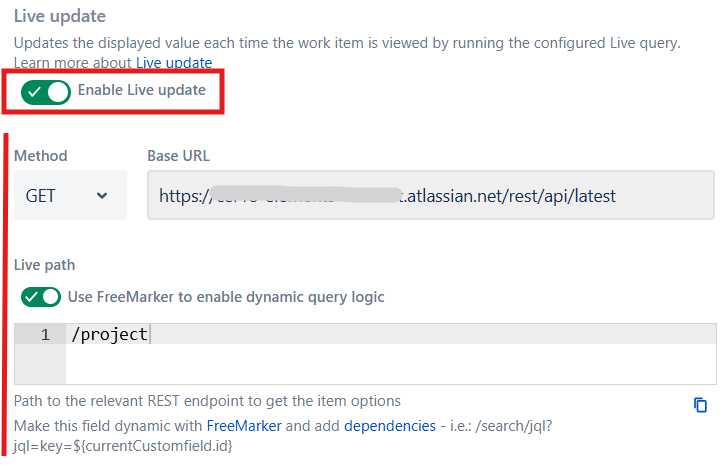
When Live mode is enabled:
-
The display value refreshes on issue view, each time a user opens the Jira issue
-
The refresh relies on a dedicated query (separate from the initial query used to populate the field's options):
-
Live path for REST API data sources
-
SQL Live Query for database data sources
-
Why use a separate Live path/query?
A Live path is useful when:
Optimizing calls to the data source
Example:
-
-
The initial path retrieves all issues from the source (used once, when the user opens the field to make a selection)
-
The Live path retrieves only the selected item (used each time the Jira issue is viewed, so it needs to be efficient)
Using a lighter Live path reduces the load on your data source when many users view Jira issues frequently.
-
Avoiding $userinput problems
$userinput values are only available at selection time, they cannot be reused in Live paths, which run when the Jira issue is viewed (no user input is available at that moment). Instead, Live paths rely on the stored ID of the selected value to fetch its current state.
Filtering by the current field value
In your Live path, you can reference the stored ID of the current field value. The syntax depends on whether FreeMarker is enabled and whether the field is single-select or multi-select:
|
|
FreeMarker enabled |
FreeMarker disabled |
|---|---|---|
|
Single Select |
|
|
|
Multi Select |
Although all the other configurations are returning a string, this one returns a list. Use operators such as |
|
Example – Jira API
This example shows a Jira-to-Jira setup where the connected custom field lists issues from a project (MYPROJECT) and refreshes only the selected issue's data on each view:
Initial path:
/search/jql?jql=project=MYPROJECT&fields=*all
Live path:
Single select:
/search/jql?jql=key=${currentCustomfield.id}
Multi select:
/search/jql?jql=key in (${currentCustomfield.ids?join(",")})
In these examples, FreeMarker is activated.
If FreeMarker is not activated replace ${currentCustomfield.id} by $currentCustomfield.id
Known limitations
-
The “Live” update takes into account the cache, which means that it can take some time to reflect data source changes in the connected custom field, depending on what you’ve configured in your datasource & field.
-
For Live fields, the value is only updated when the issue is viewed, nowhere else, which can lead to discrepancies on reports or JQL filters.
Frequently asked questions
Which Elements Connect fields support Live update?
Only connected custom fields with the Object storage type support Live update. Snapshot fields store a fixed value at selection time and do not refresh dynamically.
When does the Live update refresh the field value?
The Live path (or SQL Live Query) runs each time the Jira issue is viewed. It does not run in reports, dashboards, or JQL filters that don't open the issue.
Can I use $userinput in a Live path?
No. $userinput values are only available at selection time. Live paths run on issue view, when no user input is available. Live paths use the stored ID of the field value instead.
What's the difference between the initial path and the Live path?
The initial path retrieves all options to populate the field (used when the user opens the field to make a selection). The Live path retrieves only the currently selected item to refresh its display value on each issue view. Using a lighter Live path optimizes calls to your data source.
Does Live update work with a Jira-to-Jira data source?
Yes. Live update works with any REST API or database data source, including a Jira REST API data source pointing to your same Jira Cloud instance or another Jira Cloud instance.