
What’s in this page
While using Elements Connect, you may have encountered the following banner, at the top of the app.

With the introduction of App Editions, all customers have automatically been moved to the Standard edition. Data have been kept as-is, and, for some, configuration are above edition limits. In that specific case, action needs to be taken by the end of their billing period.
This page aims at providing more details about:
-
Standard edition limits
and how to identify what’s above limits -
Actions to be taken
by the end of the billing period
1. Standard edition’s limits
As mentionned in the Elements Connect documentation for app editions, you will see that Standard edition is limited in terms of:
-
Number of active data sources (3)
-
Number of active connected fields (20)
-
Minimum cache value for data sources and connected fields (5 minutes or 300 seconds)
If you see the banner presented above, it means your configuration is currently exceeding one of these limits (at least). If you want to identify these clearly, you can go into the application >> Usage tab and check values in red (if any).
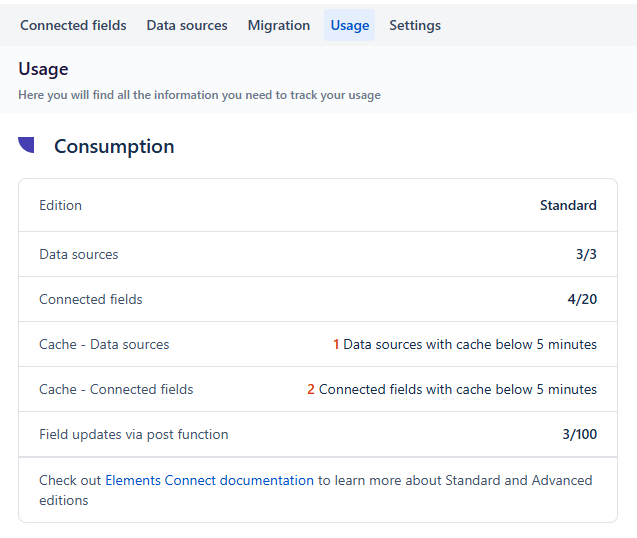
Described by this picture, you can see a configuration
-
In standard edition
-
With
-
3 data sources (ok)
-
4 Connected fields (ok)
-
-
But
-
1 data source has cache below 5 minutes
-
1 connected field has cache below 5 minutes
-
In that case, cache is what needs to be changed.
2. Actions
For customers in Standard edition with configuration exceeding limits, action needs to be taken by the end of the billing period.
You can either:
-
Upgrade to Advanced edition to better support your usage and scale.
Check Elements Connect documentation for app edition to see how to perform the upgrade. -
Or adjust your configuration to stick to Standard i.e.
-
Deactivate (or delete) a few connected fields and/or data sources
-
Update cache value
-
Check the documentation page dedicated to active & inactive fields here for more detailed information on how to disable connected fields and data sources and understand the impact of inactive connected fields in runtime.
AT THE END OF THE BILLING PERIOD
If you decide to stay on the Standard edition but still have more active data sources or active connected fields than the edition allows, what’s exceeding will be automatically set as inactive.
To define which item should be deactivated, we compute a score:
-
For a connected field: the number of values for each fields (i.e. number of tickets for which the field has been populated).
-
For a data source: the average of each associated connected field score.
Then the logic:
-
If you have more than 3 data sources, we disable data source (i.e. all related connected fields) with the lowest score until you reach 3 data sources
-
Then, if you still have more than 20 connected fields, we disable the custom fields with the least number of values until you reach 20 connected fields. Note that parent fields are preserved as long as there is still an active child field.
All cache below the limit will be set to 5 minutes.
Note that NO DATA WILL BE DELETED DURING THE PROCESS. Everything remains for you to check and/or activate.
Need help?
If you have any further questions or need assistance, please don't hesitate to contact our support team. We're here to help you choose the right edition and make the transition as smooth as possible.