
Clicking the Productivity score card on the Dashboard opens a dedicated page showing what lies behind the score: which operational indicators are pulling it up or down, and how they have evolved over time.
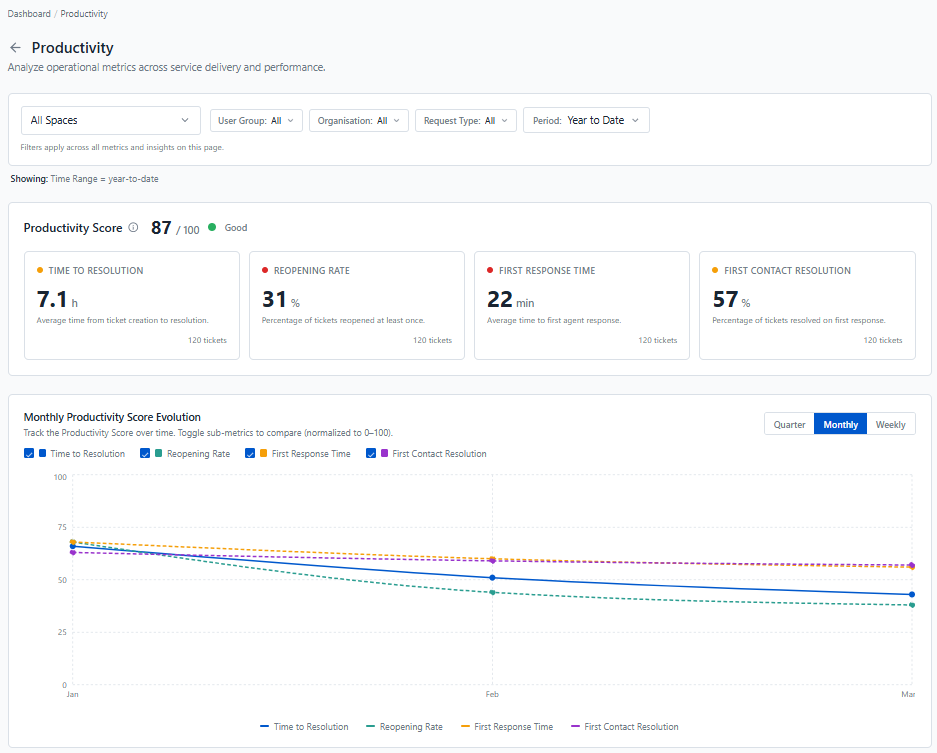
Productivity Score
The top of the page shows your overall Productivity Score out of 100, with its status, followed by the four indicators it is built from:
-
Time to Resolution: how long it takes, on average, to resolve a ticket.
-
Reopening Rate: the share of tickets reopened at least once.
-
First Response Time: how long employees wait, on average, for a first agent response.
-
First Contact Resolution: the share of resolved tickets handled with minimal back-and-forth, meaning tickets that received at most 2 public agent comments.
Each card shows the indicator's actual value (in hours, minutes, or percent), a coloured dot for its status, and the number of tickets it is based on. At a glance, you can see which indicator needs attention: in the example above, the overall score is good, but Reopening Rate and First Response Time are flagged in red.
The number of tickets can differ from one card to another, since each indicator only counts the tickets it applies to (for example, only tickets that have been resolved count toward Time to Resolution).
Monthly Productivity Score Evolution
This chart shows how each indicator has evolved since the start of the year, on a common 0–100 scale so they can be compared directly. It helps you tell whether a weak indicator is a recent drop or a lasting trend, and whether the actions you've taken are paying off.
Switch between a quarterly, monthly, or weekly view, and use the checkboxes to focus on the indicators you're interested in. Hover over a point to see the exact values for that period.
Use the filters at the top of the page to compare productivity across spaces, user groups, organisations, or request types.