
The migration process runs asynchronously and in multiple stages.
-
Creation of Elements Connect custom fields in Jira Cloud
-
Migration of Elements Connect field values
Created Connected custom fields will only be partially preconfigured.
These fields will need to be configured in Step 3.
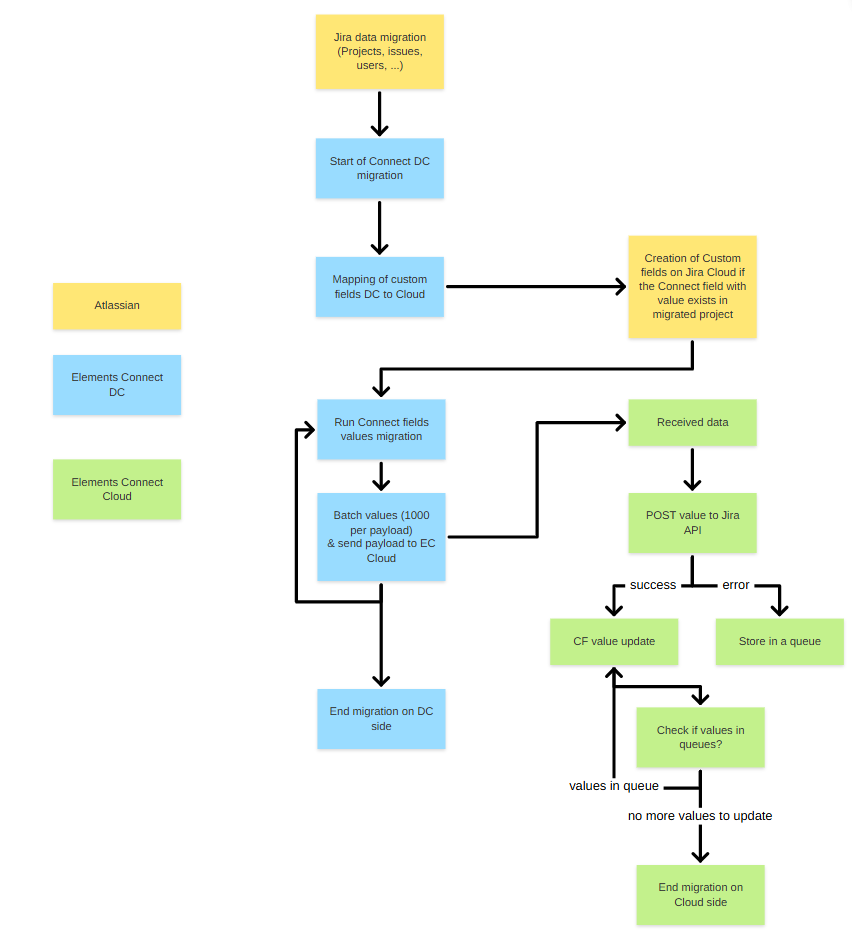
On the Data Center side
1 - Field mapping
If a Jira project containing Elements Connect fields has been migrated during this JCMA migration, send Elements Connect custom field format to Jira Cloud for custom field creation.
More information on Field mapping: Field mapping during migration
2 - Field values migration
For each selected project:
-
Field values are sent to Cloud
-
Data is transmitted in batches of 1,000 issues
-
Once all batches are sent, the DC side of the migration is complete
On the Cloud side
For each value:
-
The app updates the Cloud field using the Jira Cloud API
Because Jira Cloud enforces API rate limits:
-
Some update calls may be temporarily rejected
-
Rejected updates are automatically placed in a queue
-
The system retries them until successful
This ensures all values are eventually migrated.