
After values are migrated, you must configure each field in Cloud.
Data sources configuration
Go to: Elements Connect → Data sources tab
Configure the data source connections you will need for your fields.
==> see Data sources configuration.
Connected custom fields configuration
Go to: Elements Connect → Migration tab → Migrated custom fields
For each field:
-
Click the ⋯ menu
-
Select Add configuration
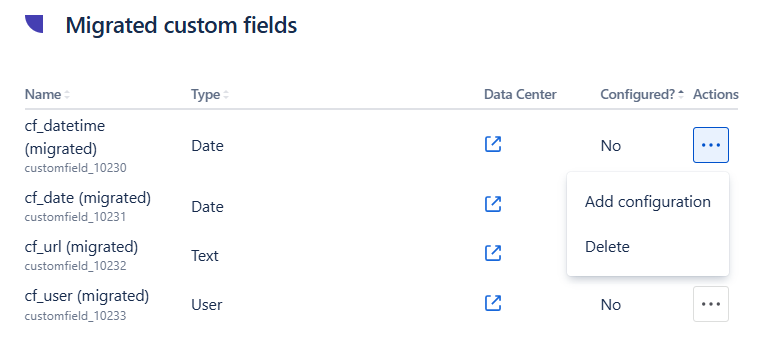
You can use the Data Center link to open the original field configuration in Jira Data Center and replicate its setup.
When adding configuration, define:
-
The Data source
-
Whether the field is:
-
Select list
-
Read-only
-
-
How it fetches data from the external source. See 1 - Fetch data from data source
-
How data is displayed. See Template guide
Once all migrated fields are configured:
Your Connected custom fields:
-
Can be edited in work items
-
Fetch data from your external data source
-
Are fully operational in Jira Cloud