
This behavior has been introduced since Elements Connect 8.0.2.
Symptoms
-
A JNDI datasource that previously worked no longer returns any result.
-
Typically affects JNDI datasources whose Tomcat resource is not named with a
jdbc/,mail/orejb/prefix (for example a resource namedtestand a JNDI namejava:comp/env/test).
Cause
To strengthen the security of our app and prevent JNDI injection (lookups to remote locations such as ldap:// or rmi://), Elements Connect now only accepts JNDI names located in the application server's local naming namespaces.
Consequently, the JNDI name configured in the datasource must start with one of the following prefixes:
-
java:comp/env/jdbc/(Tomcat resource namedjdbc/...) -
java:comp/env/mail/(Tomcat resource namedmail/...) -
java:comp/env/ejb/(Tomcat resource namedejb/...) -
java:global/,java:module/,java:app/
If the JNDI name does not start with one of these prefixes, the query is rejected.
How to check if you are affected
-
Go to Elements Connect administration → Datasources and open the JNDI datasource.
-
Look at its JNDI name and check whether it starts with one of the prefixes listed above.
-
Prefixes are case-sensitive:
java:comp/env/JDBC/is not accepted. -
If the JNDI name does not start with any of these prefixes, the datasource is affected.
Example
The resource is declared in the server.xml file with the name test:
<Resource name="test"
	auth="Container"
	type="javax.sql.DataSource"
	driverClassName="..."
	url="..."/>
The corresponding JNDI name in Elements Connect is java:comp/env/test:
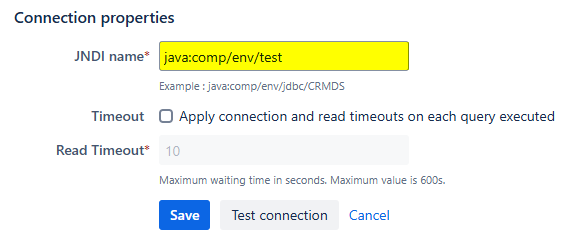
This name does not start with an accepted prefix (java:comp/env/jdbc/, java:comp/env/mail/ or java:comp/env/ejb/).
This JNDI datasource is therefore blocked.
In Elements Connect versions 8.0.2 to 8.0.6, the connection test of a JNDI datasource succeeds even when the JNDI name is not allowed. However, all Connect fields using this datasource fail with the following misleading error:
"The SQL request has been blocked because it contains a write operation : '<query>'"
We recommend upgrading to version 8.0.7 or later, which displays a clearer error message, and then checking that the JNDI name uses one of the accepted prefixes.
Resolution
Rename the JNDI resource so that it uses one of the accepted prefixes (usually jdbc/ for a database or a JDBC driver):
-
Edit the
<jira-install>/conf/server.xmlfile and add the prefix to the resource name:XML<!-- Before --> <Resource name="test" auth="Container" type="javax.sql.DataSource" driverClassName="org.relique.jdbc.csv.CsvDriver" url="jdbc:relique:csv:/path/to/ElementsConnectFiles?separator=,"/> <!-- After --> <Resource name="jdbc/test" auth="Container" type="javax.sql.DataSource" driverClassName="org.relique.jdbc.csv.CsvDriver" url="jdbc:relique:csv:/path/to/ElementsConnectFiles?separator=,"/> -
Restart Jira. On Jira Data Center, apply the change on every node.
-
Go to Elements Connect administration → Datasources, edit the JNDI datasource and update its JNDI name accordingly (for example
java:comp/env/jdbc/test). -
Click Test connection, then re-test the query of a Connect field linked to this datasource.